ZenDreamer · AI Video Studio for Windows

Let your imagination
flow.

Storyboard, generate, edit, and export your entire video in one desktop workspace. AI generation lives directly inside the edit, so generated media becomes normal media you can cut, layer, refine, and finish.

Desktop editorBuilt-in AI generationEditable final cut
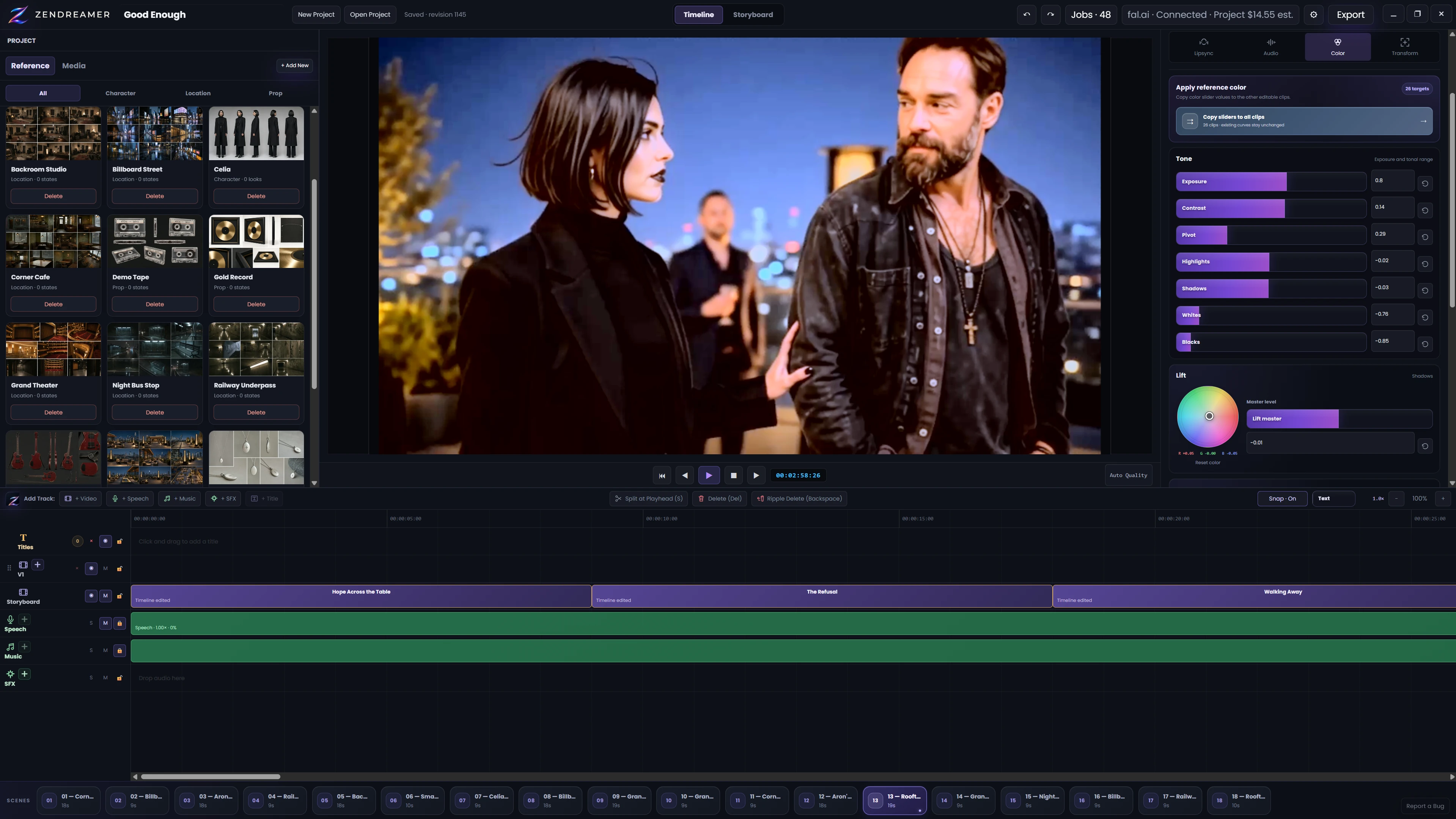
ZenDreamer timeline workspace with a program monitor, project media, Inspector, speech and music tracks, and the multitrack editor
Real ZenDreamer · Timeline workspace

One project from idea to export

AI generation happens inside a real editing environment.

Plan the sequence, create the shot you need, keep it with the project, then edit it on the same timeline as every other piece of media.

01Idea
02Storyboard
03Generate a shot
04Edit on timeline
05Export
ZenDreamer Storyboard showing scenes, generated shot cards, the Shot Inspector, shot locks, and reusable project references
Real ZenDreamer · Storyboard workspace
ZenDreamer Timeline showing project media, a dialogue scene, lipsync controls, storyboard-linked clips, speech and music tracks, and scene navigation
Real ZenDreamer · Timeline · Lipsync workspace

Real ZenDreamer workspaces from the current Windows private beta.

Why ZenDreamer

Stop rebuilding your video between tools.

ZenDreamer keeps planning, generation, media, versions, and editing inside one project, so your attention stays on the film instead of a chain of disconnected services.

THE USUAL ROUTE

The fragmented AI video workflow

IdeaPlanning toolImage generatorDownloadVideo generatorDownloadLip-sync serviceDownloadTraditional editorSomething does not matchRepeat
THE ZENDREAMER ROUTE

One continuous creative workflow

01Idea
02Storyboard
03Generate
04Edit
05Export

Generated media stays with the plan, its versions, and the final edit.

A creative instrument, not an automation machine

Finish with your judgment—not a one-click result.

AI creates possibilities. You decide what belongs in the film. Every result stays open to comparison, timing changes, picture and sound work, and the final call only you can make.

01StoryYour call
02ShotsYour call
03VersionsYour call
04TimingYour call
05EditYour call
06Final outputYour call

Generate with AI. Finish like an editor.

The tools to shape the result properly.

ZenDreamer is a Windows desktop editor first. AI-generated media joins the same project and the same editing model as imported footage, images, and audio.

01

Multitrack timeline

Layer video, speech, music, sound effects, and titles in a normal editable sequence.

02

Precise clip editing

Trim, split, move, copy, paste, snap, mark, lock, and refine timing down to the frame.

03

Takes & versions

Compare generated and imported versions, choose the active take, and keep good work intact.

04

Picture finishing

Adjust transform, crop, opacity, transitions, color correction, and YRGB curves.

05

Titles & sound

Add styled titles, shape audio gain and fades, and keep dialogue, music, and SFX organized.

06

Reliable output

Relink moved media, recover project state, and export project-matched H.264 video with AAC audio.

Explore the full feature list

Built for independent creators

One creator can carry the whole vision.

Move from the first visual idea to a finished file without handing the project off at every stage.

A lone character looking across a cinematic mountain landscape01

Storyboard format

Story

Narrative scenes shaped around characters, emotion, and continuity.

A singer performing under magenta and blue stage lights02

Storyboard format

Music Video

A rhythm-aware visual treatment built around your uploaded song.

A product bottle lit on a studio set03

Storyboard format

Commercial

A focused product or brand story with a clear advertising arc.

Controlled AI spending

Know what happens before you create.

Connect your own supported fal.ai account. ZenDreamer keeps provider usage visible and separate from the future app license, while billable actions remain under your control.

01

Visible estimates

See a current estimate when the provider can supply one—or a clear unknown-cost label when it cannot.

02

Explicit submission

Confirm billable batches before they start. Automatic continuation follows only the spend or job limit you approve.

03

No silent retries

A retry is a separate, visible action. Interrupted work reconnects to its saved request instead of submitting again.

ZenDreamer private beta

Plan it. Generate what is missing.
Finish the whole video.

ZenDreamer is a Windows desktop AI video studio built for a world where media can be generated as part of the creative process.

No download or license key is issued when you join the waitlist. The private beta is invite-only.